Dear visitor who can read English
This page is a page translated automatically by Google AJAX Language API.
Please comment to this page if you could not understand. A PERSON will review this page .
I think that you will be able to understand this page later. Please give a little time to us.
Best regards,
This site is support & information site of WEB,and Software. This site might help you that create software or Web Site…perhaps?[:]
Description:
Joomla! 1.5 in, RSS will be installed to release the module.
Therefore, to do anything without some basic RSS that made the delivery.
Again, Joomla! 1.5 of the RSS and I want to see how easily described.
RSS is a simple summary of site updates, refer to the format for delivery.
"RSS will publish updates to the information in writing."
That, in this case, simply "RSS to publish"
And expression.
To publish a RSS
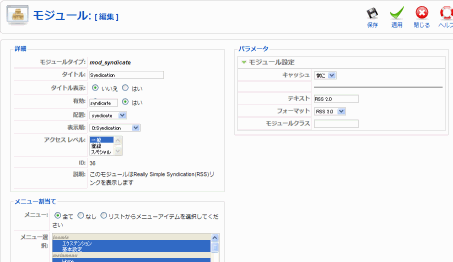
Joomla! Management (admin) from the screen, [Extension]
- Management Module]
- [Syndication]
You just need to be enabled.
Be specified for a disabled menu item to a common set of information modules, but what are the parameters of the individual visitor is unlikely.
You can set here, the following parameters.
Parameter name
Commentary
Text
Specify the name of the RSS text link to view the site
Format
RSS format (version) specifies the
Class Module
Name suffix of the module
Almost as good initial values.
A special format other than 2.0 or if you want to specify, for example, if you want to change the display text, set here.
Well, you enable this module, all in the article, if you want to be effective, it's not.
This module will automatically create the RSS information, each section, each category is the front page. (Article, archive and extension, RSS links are not displayed.
)
I've enabled this module, RSS IRASSHARE If you believe that a link does not appear, please try to create a menu item to display the list section.
And please see the list click on the section of the menu.
Perhaps, RSS and links to view and mark up.
If you are using FireFox, the following RSS URL into the address bar I see a mark that is.
Also, similar to the page where I have the RSS and other links.
(Not as long as you do not see the template)
RSS link address is as follows: Basically.
http://www.exmaple.com/index.php?option=com_content&view=section&id=xx&format=feed&type=rss
http://www.exmaple.com/index.php?option=com_content&view=category&id=yy&format=feed&type=rss

id=xx:xx is section ID
id=yy:yy is category ID
In addition to the category list page or section, if you want to show the RSS links to the custom HTML to create a basic module, the image (picture) with the links above to set the URL page added good paste.
Tentative, since the "RSS mechanism whether or not to display the link."
You have been so described, and also to prevent the display of all articles that are individually programmed to think.
RSS mechanism whether or not to display the link
The mechanism whether to display the link of RSS is very simply.
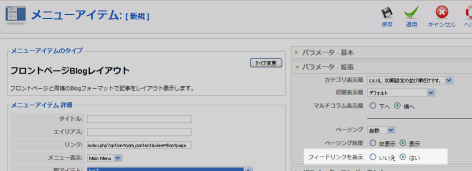
Each section, each category, there are parameters that display the feed link to the front page of the menu item parameters.
It "● Yes" and if specified, RSS will be displayed on the landing page of the menu item links.
The following is a screen image to feed link parameters shown in the front page of the menu items. If you want to view the RSS link is, "● Yes" is specified.
Easy flow of the program, and the process flow shown in the following.
Content component (com_content), have shown a feed link "● Yes" if, HTML to add the RSS link information.
--- In fact, printing out the information below.
Syndicate Module (mod_syndicate), to determine whether the link information.
It might have links, RSS links and information created, HTML output.
Php reference
modules/mod_syndicate/mod_syndicate.php
modules/mod_syndicate/helper.php
It is similar to the above trend in the development of articles, HTML in the RSS links to information you can add information, RSS link to you will always appear.
However, "simply tell us that the RSS is published," only to the extent that, for every article you just want to show the RSS links, custom HTML may be enough.

 Description:



Leave a Reply