

WordPress security check!!
WordPress Plugins to have security checks.
Download,
WP Security Scan from a can.
Install the plug-in as normal Plugins- Add New- [Upload]From where to download from where you downloaded the ZIP file and install it.
After installation, enable the plug-in.
When you enable the plug to the bottom left of the screen control "Security" tab will appear.

Check results are displayed in the middle of the screen like this: When you click on that tab.
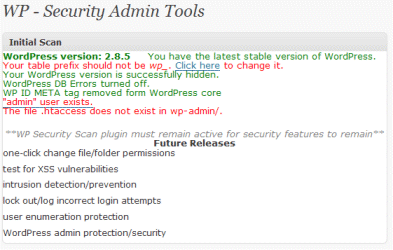
Be checked here is the following points.
- I have set a strong password (do not check automatically)
-passwords
Security there is something to check the menu of a strong password. - What are the file permissions are set correctly (no automated check)
-file permissions - Security check of the database (wp_xxxx check the table prefix name)
-database security
Security there is something to change the menu and table prefix name. - Version information that is hidden
-version hiding - Manage WordPress admin user is not used as is or
-WordPress admin protection / security
You can change the image below in SQL.(Newadmin:New name)
update wp2_blog_off_users set user_login = 'newadmin' where user_login = 'admin'; - WordPress does not continue to use the META tags
-removes WP Generator META tag from core code
In addition to the above,. Htaccess please set the wp-admin directory…Is said.
. htaccess contents is a good idea to set something like the following.
Options All-Indexes
※ Options and sometimes I can not use.If so, let's at least set to index.html in each directory.
Quick, I feel like this.
Using this, the message does not appear as red, at least I guess you need to leave.
Also, I mean what are really hide the version information?
Little, but some have doubts, what case, remain completely naive, since no good at all, let's improve it a little plug.
Reference site:11 Best Ways to Improve WordPress Security
You might also like:
Comments
Leave a Reply
Transrator


Recent Posts
- Print PHP Warning (Invalid CRT parameters detected ) by qTranslate on WordPress
- How to use your original mysql table in WordPress post.
- A Few SQL to rescue you with WordPress
- Redirect Loop by qTranslate on WordPress 3.0
- How to use GMail with WordPress
- How to use More-Feed-Excerpt WordPress Plugin
- Broken language file(mo file) by qTranslate ?(2)
- Broken language file(mo file) by qTranslate ?
- How to convert from posts of Joomla! to WordPress
- How to monitor ping send to ping servers with Wordrepss
Categories
- Joomla! (8)
- Installation (1)
- MySQL (2)
- コマンドヘルプ (2)
- SEO (10)
- WordPress (57)
- Installation (1)
- プラグイン (32)
- Preferences (21)
- Software (8)
- KDE related (1)
- Office Related (2)
- SQLite (1)
- Related WEB (3)
- Development / Languages (7)
- Noise (7)
- Uncategorized (3)
Tag Cloud
execute remove フロントページ 投稿ページ トップページ install WIndows Note Convert META generator 日付 donwload file manage multibyte utf-8 unicode shiftjis euc console サイトマップ 問題 ParmaLink Redirect パーマリンク はみ出る pre 幅 テンプレート テーマ タグクラウド マルチランゲージ リダイレクト PHP(タグ) タグ table control HTML(タグ) コマンド 国際化(翻訳) SQLite(タグ) MySQL(タグ) qTranslate プラグイン(タグ) Wordpress(タグ)Links
Site Description
Joomla!, Wordpress as CMS using a site building, site management, software usage to describe the development tips.


